Monster Trucks Game for Kids 2
- 4.1
- Rating
- 100.00M
- Installs
- Free
- Price
 Analysis by App-foxy
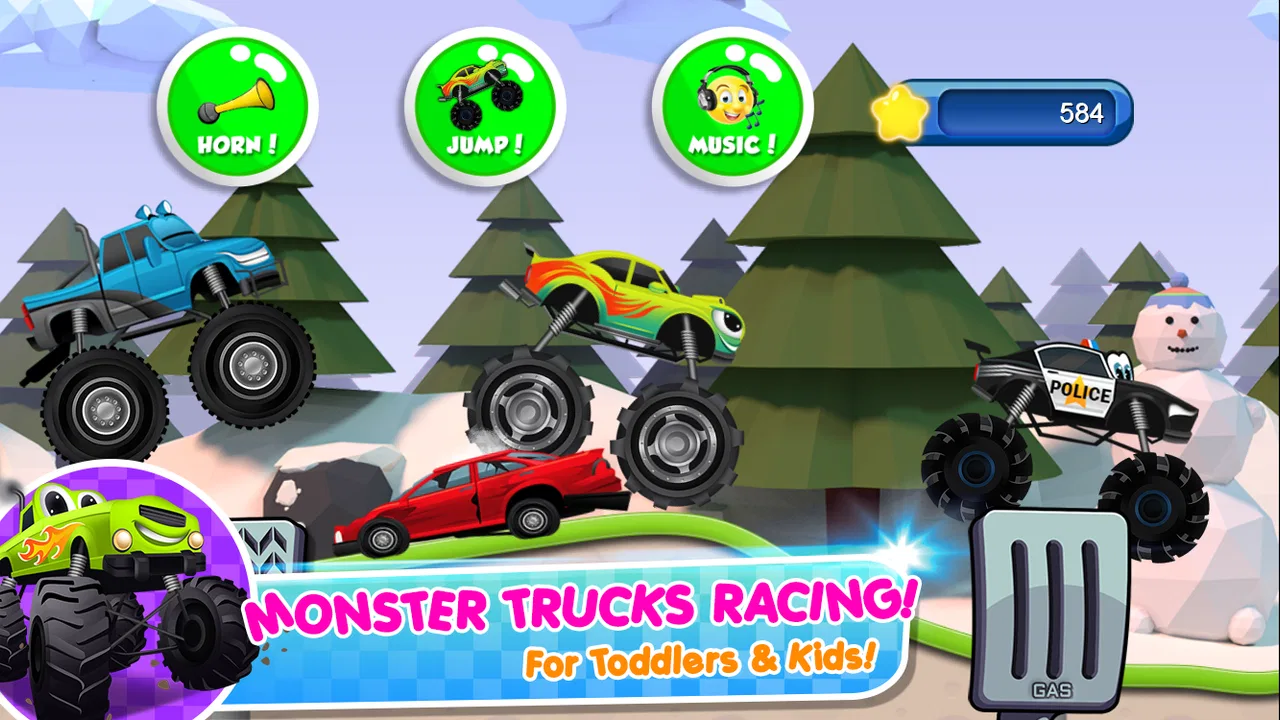
When I tried Monster Trucks Game for Kids 2, I found a simple driving game that understands its audience very well: young children who want to make big trucks move, jump, and race without dealing with complicated menus or difficult controls. My overall view is positive, but with an important qualification. This is best treated as a short, cheerful play session for toddlers and preschoolers, not as a deep racing game or a complete educational course.
The game comes from Raz Games and sits in the educational section, although its learning value is mostly connected to basic interaction, attention, timing, and cause-and-effect rather than formal lessons. It is free to start, suitable for Everyone, and available on devices running Android 6.0 or later. Those details make it easy for families to try, especially when a child is asking for a monster-truck game and a parent wants something more age-appropriate than a competitive racing title.
What the driving experience gets right for young children
The strongest part of the experience is its accessibility. A small child can understand the central idea almost immediately: choose a truck, start moving, and enjoy the action. There is no need to explain realistic steering, braking, fuel, damage, or complicated racing rules. That simplicity is not a weakness at the beginning; it is precisely why the game works for children who are still learning how touch controls respond.
You May Also Like

 Blood Strike: 2.5 Anniversary
Blood Strike’s Loadouts Turn Every Drop Into a Tactical Gamble
A close look at Blood Strike’s custom loadouts: how fast access to signature weapons reshapes its battle royale rhythm, rewards preparation, and narrows the gap between fights.

 Pandora - Music & Podcasts
Pandora’s Music Is Easy to Start, but Harder to Recover
Pandora’s strength is its low-effort path from a seed to a station. Its weak spot is how much confidence it asks you to place in connection, setup, and quiet recovery.

 8 Ball Pool
8 Ball Pool Is Built on Rivalries, Rematches, and Routine
A close look at the rivalries, rematches, shared routines, and unanswered safety questions that turn a quick pool match into a persistent mobile community.

 Samsung Music
Samsung Music’s Quiet Strength Is Playing What You Already Own
Its reach comes less from spectacle than from dependable access to a personal library. That simplicity is both the app’s strongest retention engine and its ceiling.

 AccuWeather: Weather Radar
AccuWeather Review: A Quick, Clear Forecast for Everyday Decisions
For everyday plans, the best forecast is the one you can understand quickly. AccuWeather makes rain timing, radar, and local conditions easy to act on, with a few trade-offs.

 Hill Climb Racing
Why Hill Climb Racing Still Turns Crashes Into One More Run
A tiny car, a bumpy hill and one more upgrade: Hill Climb Racing keeps resurfacing because its simple chaos makes every near-miss feel personal.
More From Our News Desk



I especially like the way the large vehicles create an immediate sense of excitement. Monster trucks are naturally appealing to young players because they look oversized and powerful, and the game builds on that appeal instead of burying it under menus or technical detail. A child can focus on the movement and visual feedback rather than wondering what every button means.
For a parent, that creates a useful everyday scenario. Imagine needing a few quiet minutes while waiting at a restaurant, sitting in a reception area, or traveling a short distance. This game can provide a contained activity that a child can begin with very little help. I would still supervise the first session, mainly to show where to tap and to check how the child handles the device, but the learning curve is gentle enough that many children can continue independently afterward.
Another strength is that the game does not ask a young player to understand the conventions of a serious racing simulator. A preschooler who cannot yet manage several controls at once is not being placed at an immediate disadvantage. That makes it more welcoming than many racing games designed for older children, where speed, precision, and winning are the entire point.
The educational label also makes more sense when viewed through the child’s actions. The player practices anticipating movement, noticing obstacles or changes in the track, and coordinating a tap with what is happening on screen. These are modest skills, but they are appropriate for an early-touch experience. I would not use it as a replacement for a learning app built around letters, numbers, or reading. I would describe it instead as play with a small amount of developmental value.
Its broad reach is notable: the game has passed one hundred million installs and holds an average rating of 4.1 from users. Those figures do not prove that every child will enjoy it, but they do suggest that the basic concept has connected with a large audience. I think that makes sense because the theme is immediately recognizable and the interaction is easier to grasp than the controls in most conventional racing games.
Why the low-pressure design matters
Young children often lose interest when a game punishes every mistake. A title that demands perfect timing can quickly turn a fun activity into a frustrating one, especially when the child is still developing fine motor control. The appeal here is that the truck itself is the star. The child gets to experiment with movement and enjoy the spectacle without needing to perform like an experienced player.
That does not mean every moment is equally engaging. The simplicity that welcomes a toddler can feel limited to an older child. A child who already enjoys racing games may ask for more speed, more challenge, or more control than this experience is intended to provide. I see that as a question of fit rather than a flaw in the basic design.
One practical tip is to use the game as a shared activity rather than handing it over as an all-purpose distraction. During the first few plays, I would ask the child what the truck is doing, whether it is moving quickly or slowly, and what might happen next. That turns a short driving session into a chance to practice observation and language without pretending the game is a structured lesson.
It is also worth keeping sessions short. The uncomplicated gameplay is ideal for brief bursts, but it may not hold a child’s attention for a long stretch. If your goal is a game for a long car journey, you may need to alternate it with drawing, music, books, or another activity. Its strength is quick access, not endless variety.
The trade-off between simplicity and depth
The main limitation is the same feature that makes the game approachable: there is not much complexity to master. I would not recommend it to a child who wants a detailed racing career, advanced vehicle customization, realistic physics, or a strong sense of progression. Those players will probably be happier with a more substantial racing game designed for older children.
Parents should also remember that free does not necessarily mean completely cost-free during use. The game is free to download, while optional in-app purchases range from ninety-nine cents to three dollars and ninety-nine cents per item. I would check the device’s purchase controls before letting a child play alone. Even when a child does not understand buying, brightly presented options can invite accidental taps or repeated requests.
That purchase model is not automatically a reason to avoid the game, but it is a reason to set expectations. I would explain clearly which parts are available to play and which items require permission. If the child is very young, keeping the device in a supervised setting is the simplest approach. This is especially important because the game’s target audience may not yet understand the difference between an in-game choice and a real transaction.
Another point is that the educational category should be interpreted carefully. The game can support hand-eye coordination and basic problem-solving through play, but it is not the right choice if you are specifically looking for phonics, counting practice, spelling, or curriculum-based activities. For those needs, a dedicated early-learning app will offer clearer goals and more measurable progress.
I also would not choose it for a child who becomes upset when a game feels repetitive. Monster-truck action can be exciting at first, yet a player who needs frequent new mechanics may quickly reach the limits of what this title offers. In that situation, a game with puzzles, varied missions, or creative building would be a better match.
Who will enjoy it most
In my view, the best audience is toddlers and younger preschoolers who are drawn to vehicles and need controls they can understand quickly. It is particularly suitable for a child’s first contact with a racing-style game, because the presentation does not require the player to know how racing games normally work.
It can also suit siblings at different stages if the older child is willing to play gently or help the younger one. The younger player can handle the basic interaction, while the older child can talk about the trucks, predict what will happen, or take turns. I would not expect it to satisfy both children equally if one of them already wants a challenging competition, but it can work well as a shared introduction.
Families using older Android hardware may appreciate the relatively broad operating-system compatibility. The current version is 3.5.0, and the minimum requirement is Android 6.0. Before installing, I would still make sure the device has enough free space and that the child can comfortably hold it, because control difficulty can come from the screen or case as much as from the game itself.
The Everyone age rating is reassuring for parents searching for a child-friendly option, but an age label should not replace supervision. A parent may still want to observe the game’s pace, manage any purchase prompts, and decide whether the visual stimulation suits the individual child. Some children enjoy energetic vehicle action, while others prefer calmer puzzles or drawing activities.
For older children, I would compare it with a more advanced racing title before deciding. A conventional kart racer may offer stronger competition and more variety, while a construction game may provide more creative control. This game wins when the priority is immediate, uncomplicated monster-truck fun. It loses when the priority is long-term challenge or detailed learning content.
How I would use it at home
I would introduce it in a short supervised session and let the child explore before explaining anything beyond the basic control. That approach reveals whether the interface is genuinely intuitive for that particular child. If the child starts tapping randomly, I would demonstrate one action at a time rather than taking over the device completely.
After a few plays, I would use turn-taking to keep the activity social. One person can play while the other predicts what the truck will do, then they can swap. This is more useful than treating the game as a silent babysitter, and it helps a child practice waiting, describing actions, and responding to simple questions.
For travel, I would prepare the device before leaving rather than expecting a child to navigate setup in a busy environment. I would also decide in advance how long the session should last. Because the game is easy to start, it can become tempting to hand the device over repeatedly, but its best use is as one small activity among several.
For a child who is learning to control taps, I would focus on process instead of winning. Praise careful observation, trying again, and noticing changes on the track. That keeps the experience constructive even if the child does not complete a section smoothly. The game is more valuable when it encourages experimentation than when it becomes a test of performance.
Raz Games has kept the concept focused, and that focus explains both the appeal and the limitation. There is little barrier between the child and the trucks, but there is also less for an older player to discover over time. I would recommend it to a family looking for a friendly first driving game, not to someone building a large library of challenging educational games.
My final recommendation
After using it, I see Monster Trucks Game for Kids 2 as a pleasant, narrowly focused choice for young vehicle fans. It succeeds because it makes the first step into touch-based racing feel approachable, colorful, and low pressure. The large audience, free entry point, Everyone rating, and simple concept all support its role as an easy game to try.
My recommendation comes with clear boundaries. Keep an eye on in-app purchases, expect short rather than endless sessions, and do not confuse playful coordination practice with a full educational curriculum. If your child wants monster trucks and is still learning basic controls, this is a sensible download. If your child wants advanced racing, deep progression, or formal academic practice, I would choose a different category of game.
For the right age and situation, I think it earns a place on a family device. It is best when used deliberately: a few minutes of vehicle play, perhaps with a parent asking questions and taking turns, followed by another activity. That balance lets the game deliver what it does well without asking it to be something it was never designed to be.
FAQs for Monster Trucks Game for Kids 2
01What age group is Monster Trucks Game for Kids 2 suitable for?
Monster Trucks Game for Kids 2 is designed for children aged 2 to 8 years old. The game features simple controls and a kid-friendly interface, making it accessible for younger players. The vibrant graphics and engaging sound effects are tailored to capture the attention and imagination of young children, ensuring a fun and educational experience.
02Are there in-app purchases in Monster Trucks Game for Kids 2?
Yes, Monster Trucks Game for Kids 2 includes in-app purchases. While the game is free to download, additional content such as new trucks and levels can be purchased. Parents should be aware of this feature and may want to set up parental controls to manage spending and ensure a safe gaming environment for their children.
03Does Monster Trucks Game for Kids 2 require an internet connection?
Monster Trucks Game for Kids 2 does not require a continuous internet connection to play. This makes it ideal for on-the-go entertainment, such as during travel. However, an internet connection may be needed for initial downloads and any in-app purchases or updates that the game may offer.
04Is Monster Trucks Game for Kids 2 available on both Android and iOS?
Yes, Monster Trucks Game for Kids 2 is available for download on both Android and iOS platforms. This ensures a broad accessibility for users, allowing them to enjoy the game on a variety of devices including smartphones and tablets. You can find it on the Google Play Store and the Apple App Store.
05What educational benefits does Monster Trucks Game for Kids 2 offer?
Monster Trucks Game for Kids 2 provides several educational benefits, including improving hand-eye coordination and motor skills. The game introduces basic problem-solving tasks and encourages creativity through customizable trucks and engaging challenges. It is designed to be both fun and educational, offering a balance of entertainment and learning for young children.
Pros
- Engaging graphics keep kids entertained.
- Simple controls suitable for young children.
- Wide variety of trucks and tracks.
- Encourages creativity and imagination.
- Offline play available for uninterrupted fun.
Cons
- In-app purchases can add up quickly.
- Limited educational content.
- Repetitive gameplay might lose interest.
- Ads may disrupt gameplay experience.
- Requires moderate device storage.

Monster Trucks Game for Kids 2
Gallery